
Important! All v1.3+ versions support Cloud Save! Learn how to use Cloud Save
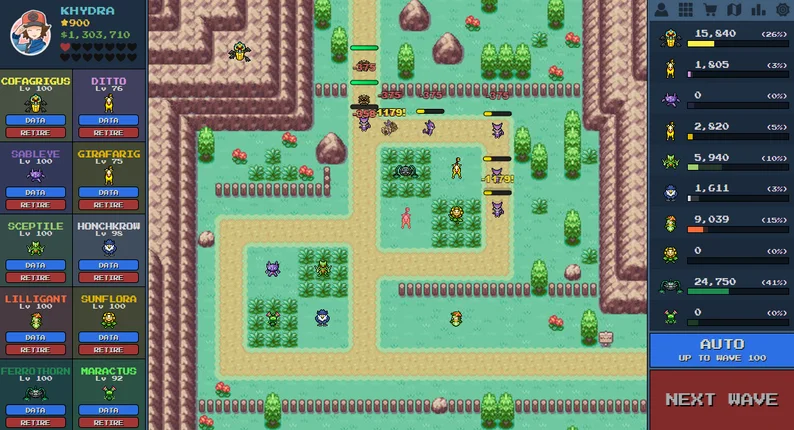
Pokepath is a Pokemon tower defense game created by Khydra, blending classic Pokemon progression with strategic, path-based gameplay. In Pokepath TD, enemies march along fixed routes, and you defend the path by placing Pokemon at key intersections, upgrading your core units, and evolving your team over time.
On pokepath.io, you can play online while using our wiki + strategy —optimal team builds for every route like the Best Teams series and player-contributed builds at Community Best Team Builds, boss tactics for each route, farming guides, the most comprehensive Pokepath meta guide, hidden Pokemon unlocks, plus secure cloud save support.
Pokepath (PokéPath TD) features 9 routes, each with 100 waves. Every route has different bosses and enemy types. In pokepath td, the key is building the right team composition based on enemy types. Additionally, players use gold to purchase and upgrade Pokémon—so getting stronger means mastering both team building and farming.
Building the right team in Pokepath TD requires targeting specific enemy types. Here's a classic example—defeating REGIROCK: To defeat REGIROCK, you can only use Poison Pokémon. This is because REGIROCK is immune to all other status effects, and no Pokémon can deal 1 million direct single-target damage. Among Poison Pokémon, ARIADOS has the fastest attack speed, making it the best choice. Interestingly, you only need to manually control two spiders to keep attacking REGIROCK until it dies from poison damage. Use ARIADOS + DITTO (copying ARIADOS)—the fastest Poison Pokémon. Keep both attacking REGIROCK to stack poison damage.
Farming is the key to quickly earning gold in Pokepath. However, beginners need to reach a certain stage before they can start farming effectively. At pokepath.io, we divide farming into two phases. To preserve the discovery experience, we won't detail specific strategies here—check out our Best Farm Team Guide for the full breakdown.
Q1: Where can I download the desktop version of Pokepath?
A1: If you're on PC, you can find the download button on the right side card of the POKEPATH.IO homepage.
Q2: Where do I equip items on my Pokémon in Pokepath TD? I can't find it!
A2: Go to your Pokémon roster (not the backpack). Click on DATA to view the Pokémon's detailed info. You'll see a + button in the bottom-right corner of the ITEM section. Note: Pokémon that are already deployed won't show this + button — you need to retire the Pokémon first.
Q3: I'm playing the Pokepath desktop version. How do I update, and will I lose my save data?
A3: Your save data will be preserved if you do it correctly. Using Windows as an example: save data is typically stored in the AppData folder on your C: drive, separate from the game files. To update, simply delete the old game folder and install the new version. Important: Don't open multiple game windows at the same time, as this may overwrite your previous save data.
Q4: Why don't I see Pokepath TD features that people discuss in the community? I'm playing the browser version.
A4: As of January 4, 2026, the browser version on other websites is still on version 1.2.5. Most community discussions and guides are about version 1.3 content, which is why you might feel out of the loop. If you want to experience the latest features, you can play on pokepath.io or download the desktop version. See Q1 above for download instructions.
Q5: Can I export Pokepath save data on mobile? My clipboard isn't long enough!
A5: For mobile, we recommend using Google Chrome to play. When exporting data on mobile, select the download option instead of copying. A .txt file will be downloaded to your Google Chrome browser. Then open v1.3.3, and when importing your save, select this downloaded file.
Q6: Can I use Pokepath save data from other websites on pokepath.io?
A6: Yes, absolutely! The save code is essentially your save data encoded in base64. The code string itself represents your complete save data, so it works across any website hosting the game.
For more FAQs, check out our PokéPath TD 1.3 Update Guide & FAQ.
The PokéPath TD browser version may occasionally experience bugs or stability issues, which can result in lost progress. To protect your progress, it is recommended to export your save file regularly (Menu → Export). If you're using our online version, Cloud Save can help—but keeping an export backup is still the safest habit.
PokéPath TD is a fan-made game inspired by the Pokémon universe. It is not affiliated with or endorsed by Nintendo, Game Freak, or The Pokémon Company.